

Your personal time-shifter.
TimeTracker "Time Shift" Background Recorder
TimeTracker is a powerful, flexible "time shifting" background recorder that lets you capture live network newscasts, closed-circuit network advisories and actuality feeds, sermons, speeches, concerts, and anything else you need to "record now, play later." Grab an unlimited number of recordings from various input sources* that can each repeat on their own custom recording timetables.
As with our other products, TimeTracker is carefully designed for clarity of purpose and ease of use. Moments after launching the program, you'll find yourself happily scheduling delayed recordings using controls that actually make sense.
Make every time-shift recording unique...
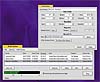
TimeTracker gives you complete control over each time-shift audio recording event you schedule.
- Unlimited number of scheduled events.
- Set a unique start and stop time for the event. Start and stop times are deadly-accurate.
- Specify the frequency of the event; hourly, daily, weekly, monthly, even yearly.
- Choose the overwrite status of each event. You may overwrite it, time or datestamp the filename, add sequential numbering to the filenames, or fail the recording if the cut already exits.
- Date-stamped recordings can be automatically selected and played by their date in AutoCast using our GetPlay feature.
- Each event may be recorded to a different location and filename.
- When used with our switcher package, you can select a unique input for each recording
- Any switcher output can be selected as the audio line feeding TimeTracker background recorder
- Reboot recovery option allows TimeTracker to re-launch after a power failure or other problem
Very friendly in use...
TimeTracker is very polite about running as a background task, co-existing nicely with TuneTracker™ and TuneStacker ™. All three may be allowed to run simultaneously, with the only limitation that you cannot record from the computer's line input channel while also broadcasting the live input channel (not a limitation if you're using a switcher).
 |
TimeTracker™
Background Recording Software Single user license and software for TimeTracker time-shifting, background recording software, which will be sent to the purchaser via e-mail.Clicking this button certifies you agree to our terms and conditions. |
$399 Qty: 
|