

It's time to take command.
AutoCast Radio Automation Software
The centerpiece of our System 6 radio automation suite is AutoCast, which sets a whole new standard in radio automation. Never before has software this powerful, this feature-packed, this stable, this downright beautiful, been available at such an affordable price.
AutoCast truly lets you take command, with live and automated features that free you to go wherever your imagination takes you. Its DJ-friendly design handles live shows with grace and ease, and AutoCast's legendary Infinite Walkaway™ stability allows for stress-free extended periods of unattended operation.
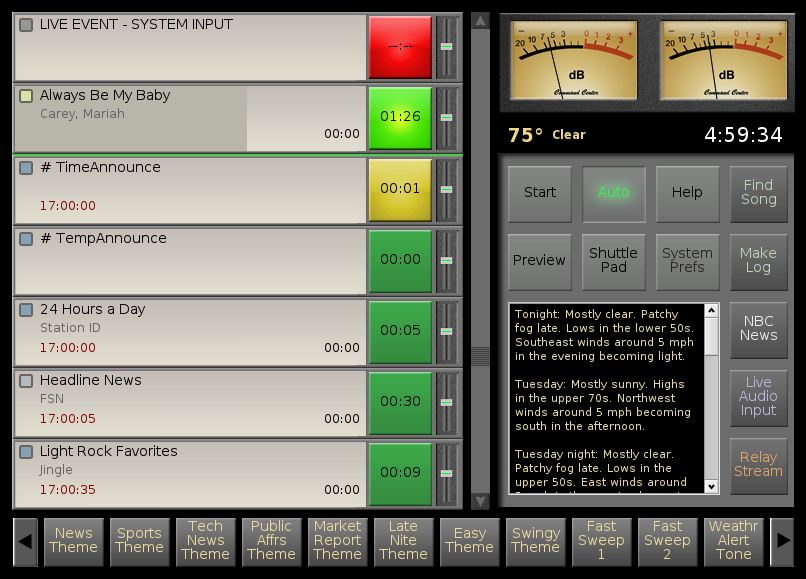
Click for FULL SIZE view
Smooth handling.
Like a fine automobile, AutoCast is the perfect blend of elegance, simplicity, and raw power. Every feature has been carefully crafted to assure a smooth, precise "driving experience."
During live operation, AutoCast's fast, nimble performance and heads-up control surface keep up with your fastest moves and tightest maneuvers. And when it's time to put AutoCast in "cruise control," you can relax, knowing it'll stay right on course, all day long.
Click on the picture (left) to see a full-sized AutoCast screen. A quick inspection of the interface will make a lot of its functionality immediately obvious. That's the way we like it.
AutoCast lives up to its name.
With its impressive automation and live show capabilities, 12-way configurable buttons, and accompanying suite of accessory programs, TuneTracker System 6 puts you in firm command of your broadcasting operation. Let's take a few minutes to explore AutoCast's features in more detail.

The power of twelve...
Each of the buttons in AutoCast's "ButtonPad" area (along the right side) and "MyShow" area (across the bottom) is customizable to perform one of a dozen different functions.
- HOT BUTTON: Instantly play any audio file.
- CART BUTTON: Play a series of audio files in rotation, "cart-style."
- TEXT BUTTON: Display a written script in the scrolling textbox (from hard drive or Internet).
- INDEX CARD BUTTON: Display the next script in a rotation, each time the button is clicked, just like flipping through index cards.
- RUN BUTTON: Launch a task, such as a program or batch file script to do downloads, etc.
- SWITCHER BUTTON: Route one or more channels on your switcher (requires ChannelCaster package).
- CLEARSWITCHER BUTTON Clear all currently-assigned audio switcher routes.
- STREAM BUTTON: Broadcast a remote audio stream or retrieve and play an audio file stored on the Internet.
- RELAY BUTTON: Send a relay closure through your switcher, to trigger the start of anything from an affiliate break, to a reel-to-reel deck, to...yes, the coffee maker!
- LINE-INPUT BUTTON: Broadcast whatever is being sent to your computer's line input.
- GAME BUTTON: Insert a game log (or other special playlist) into your program log.
- DO BACKUPS BUTTON: Do a complete system backup with one click of the mouse.
The interface is so important...
We've been there, and we understand. Too many radio automation systems, including some extravagantly expensive ones, are ponderous, difficult to use, and painful to look at. Here are three ways we've tried to make ours better.
One window, no waiting: Some automation interfaces are plagued by lots of distracting little floating windows. In AutoCast, there's just one window. Even if you flip to another view mode to access things like the program log queue, you'll do so without ever taking your eyes off the road, because what's playing, and what's next-to-play, are always right there, visible.
Easy to learn, easy to use: AutoCast is an extremely deep program, but we don't leave you feeling you're in over your head. Amazing capabilities lie beneath the surface, but only what's immediately useful is presented, so your staff isn't overwhelmed by too many onscreen options.
"Eyeball ergonomics:" AutoCast's muted shades were carefully selected to give announcers and engineers a screen that's not only elegant and intuitive, but reduces eye strain and brain drain during long air shifts.
Limitless Possibilities
There are almost no limits to what TuneTracker System 6 can do. We encourage you to take some time to look through "The List" below, hovering your mouse over the "i" next to each feature that interests you, to learn more about it.
 symbol for more info on each feature.
Acclaimed User's Guide - We put this right at the top of the list, because we think a great user's guide is the key to a great product.
Update365 now gives you free upgrades of all programs in the System 6 suite.
Intuitive "Command Screen" makes AutoCast great in a live DJ environment.
Our legendary stability and jitter-free operation.
TuneStacker music selection software (included free).
Unattended Program Log Generation option.
Music log importation Already have a favorite music scheduler? AutoCast is certified compatible by Music Master, Natural Music, Selector, Music 1, and Power Gold.
Traffic log integration with built-in support for most traffic systems.
As-Run log generated for Traffic and Billing.
Switcher (Satellite) Interface lets you run satellite-based programming, such as music services and talk shows, and switch among multiple audio sources manually and automatically. Even supports making multiple switches among input and output sources at the same time. Special features also included for network broadcasters.
ContentDepot®-Compatible Broadcast programming from National Public Radio using the ContentDepot® system.
Streaming server for Internet broadcasting.
Lightning request-finder and drag-n-drop program log editor (included free).
MakeMyDay master log creator, quickly combines format clocks into 24-hour master logs.
Live Assist Mode handles live shows smartly.
Army Knife TTE song attribute editor (included free). (video)
Transitions Editor gives you virtually unlimited control over how your songs and other audio files transition from one to the next. (video)
Time Announcements - a full set of professionally voiced, professionally-engineered and fully-customizable time announcements (included free).
Extra categories = extra creativity! - Three "Misc" attributes let you categorize music using your own creative criteria.
Temperature announcements available as an add-on feature.
Exact-time starts with fade option for joining network newscasts, etc.
Millisecond-Level Accuracy lets you adjust the timing of pauses, live audio, and satellite events down to a thousandth of a second.
Time-Corrects for "soft" time adjustments
Preview button lets you audition any song or other audio file without it going over the air.
Preview Anywhere - Listen to a song or other audio file from the desktop or many System 6 programs without it being heard on the air (requires one of our Station-in-a-Box system packages).
High Definition Audio - Support for super-high-fidelity HDaudio hardware
Web Site Updater option lets your web site display currently-playing song information.
Live365 Updater option supplies Live365 with song and station data.
Real-time weather conditions and forecast are automatically retrieved and displayed.
Completely remote-controllable with the optional TT Anywhere remote administration program.
On-the-Go Touch Control using your iPhone, iPod Touch, or iPad.
An exciting, FREE video on DVD demonstrating and explaining AutoCast is available
Remote DJs can send their voice-tracks to the system directly.
Ramp talkovers let your voice-tracks "ride the ramps."
Smart Talk Beds can automatically put music under your headlines, weather, music billboards, etc.
Highly configurable silence-sensor.
Automatic reboot recovery after a power outage.
KickStart failsafe feature monitors for trouble and solves it.
Programmable ButtonPad These buttons put the 'Command' in 'AutoCast!' They let you assign customized buttons to play audio files, do 'cart rotations,' flip through script 'index cards,' fire switcher events, display DJ scripts, trigger relay closures, play streaming audio sources, insert sports logs, even launch external programs and batch files, all with custom-labeled buttons. Use them to play jingles and show opens, display PSA scripts, bring up other studios or network feeds, play audio streams from remote locations, bring up other programs such as Lightning, even start the coffee maker. (video)
MyShow Buttons: The cartwall soundboard that does more. Pass your mouse over the Info icon for details.
Auto-Loading Customized DJ Sets automatically bring up the correct set of customized buttons for each DJ shift
Drop-and-Use Configurable Buttons detect the type of file you drop onto any configurable button, and automatically configure and label the button for you.
Drag-n-Drop program log editing right on the Command Screen with our exclusive "ShuttlePad" feature, which makes adding, copying, and rearranging items in your program log a breeze. (video)
Expandable scrolling textbox Pass your mouse over the Info icon for more on the scrolling textbox. (video)
Auto-display live scripts for DJs to read, from the hard drive or the Internet(!), and schedule popup reminders to appear in AutoCast's text box at specific times of day. (video)
Color Coding lets you see at-a-glance what sorts of items are coming up.
Play any combination of MP2, MP3, WAV, AIFF, Ogg Vorbis, ADPCM, MTS, and other audio formats, in varying bitrates and sampling rates, stereo and mono, flawlessly.
Output Log keeps a detailed text record of everything that played, in a format importable into spreadsheets for analysis.
Manual crossfader lets you do silky crossfades to any song in your program log, even out of sequence
"Push to Pause" - Push (click-hold or touch-hold) the currently-playing song's bright green button to pause it. Push again to continue.
Industry-Standard EOM Feature EOM times, even those provided with third-party music libraries, can be used to do flawless transitions, complete with quick-fades.
Sec Tones! Want hard-hitting segues on certain items? Mark cue-points on them to cause a hard transition without fade; great for jingles, sweepers, etc.
Collapsible Display lets you view your program logs complete, collapsed into hours, or collapsed into days
12 or 24 Hour Clock displays the time in standard 12-hour format or in 24-hour "military time"
Play-from-web feature lets AutoCast simultaneously download and play audio files located elsewhere, such as on an Internet web site.
Automatic Download capability. Downloads can be done on-demand using scripting (do it yourself, or available inexpensively as a service). Automatic downloads of program content from Internet web sites and FTP servers, can be done on any schedule you like.
Fixed-length automated live audio events for newscasts and other predictable-length audio feeds.
Universal Playback Access: With AutoCast, every event on your program log is its own instant audio player, complete with crossfader!
"Floor-to-ceiling" pop-out volume controls as big as those on a real mixer.
Force-to-exact second feature. Manually force AutoCast to go to the exactly right event at the precisely correct second in that event for the current time of day.
Smooth, lifelike analog-style VU meters
Overlay feature for the automated overlay of IDs or other audio at specific times.
Chime feature drops a tone, sound effect, or other audio file in, over whatever is playing, at specified times, without ducking the audio. A professionally-produced top of hour chime audio file is included.
HotTracks let you rotate through IDs, jingles, liners, etc. when specific relay closures are received.
BreakSpan™ gives you the flexibility to fill satellite breaks only when you have something to fill them with. No endless playing of PSAs to fill up every satellite break!
TriggerPlay feature allows time-calculated drops over the top of a block program.
Volume Boost can be used to automatically bump up volume on quiet events
Pre-set the playback volume manually for any track.
Trim feature lets you trim the front and back of any track (non-destructively).
Starts feature protects against an ad or other file being used sooner than it should.
Expires feature assures out-of-date audio files cannot be played, even if they were accidentally left on the program log. (video)
Last Played feature lets you see, at a glance, when any track was last played by AutoCast.
The new "Run" command can launch any computer task, letting you "automatically do anything!"
Powerful GetPlay feature automatically retrieves and plays the right files every day, even every hour, based on their filenames.
GetFile dynamically retrieves a file from a folder, regardless of its filename.
Expanded music randomization functionality in TuneStacker allows songs to be found by even a part of a word, and regardless of upper and lower case.
But NOT feature in TuneStacker factors out songs that contain elements you don't want. Find every "Fast" "Pop" "Female" song that doesn't have the Comment, "Christmas," for example.
Wire up a physical push button for remote starting (requires switcher)
Our latest free weekly QuickTip can be retrieved from online and displayed right in AutoCast.
Change the font size and style in the text box (see example screen).
Zoomable Text Box lets you increase its size for a significantly larger reading area. (video)
"Get Info" displays detailed data and backgrounder information about each song.
"Edit Song Info" sends any song into Army Knife for tweaks to its transitions, and to the info available about the song. (video)
Context Help is available for every feature by simply right-clicking on it
Full and comprehensive documentation is provided for the entire system.
Unlimited creative freedom to design any imaginable music mix with our included TuneStacker music selection software.
Smart pausing feature is immune to silence-sensor, for hassle-free overnight sign-offs.
Drag-n-Drop interactivity between Lightning and AutoCast. Find a request and air it fast.
A free copy of the slick, smooth, media-friendly "Haiku®" Operating System. Read more about it!
A free set of 25 hand-selected music beds, sound effects, and sweepers, courtesy of sounddogs.com. Listen to a sampling of included tracks.
Pre-configured hotkeys make launching programs super-fast.
A pre-configured Station folder and subfolders, for organizing your station's contents
A whole month of free telephone support.
Free ongoing e-mail support, forum support, chatroom support, and weekly QuickTips.
Backward compatibility with your old TuneTracker Basic or Pro program logs.*
Available FastTracker training DVDs can be used to teach yourself the system, and to bring new staff members up-to-speed quickly.
Available printed User's Guide lets you read up on our system from your easy chair.
AutoCast's Infinite Walkaway™ means peace-of-mind...

If a radio automation system can't be trusted to keep going when you leave it alone, it is really of no use. With System 6, you get our legendary "Infinite Walkaway." AutoCast was designed from the ground up to be a stubborn survivor...rock-solid and dependable (read our testimonials!), so you can set it up, start it up, and walk away confidently.
Even an automation that never says die can't continue "infinitely" without an ongoing supply of program logs. So our system provides you with a variety of ways to continue broadcasting programming as far into the future as you like:
- Lock-to-date: AutoCast can auto-load program logs forever, if the program logs are given dates as their filenames
- Lock-to-day: If you prefer, AutoCast can also load in program logs named after the days of the week, whether you update them or not.Or, tell AutoCast to choose each day's program log based on filenames that contain days of the week, or calendar dates.
- Bottomless program log queue: Drag and drop as many program logs into the queue as you want, for days, weeks, even months of unattended operation. Still not good enough? Click the "Repeat" x-box and AutoCast will cycle back through the entire list of program logs when it reaches the end. An obvious use of this approach is to put in a week's worth of daily program logs and have AutoCast repeat the week "infinitely."
- Loop one day: Some situations may only require a single program log, or just a portion of a day, repeated over and over. An automated public address system may only contain a dozen audio events in a mini-program log. It makes no difference. AutoCast will happily oblige.
Adding to its reliability, AutoCast comes equipped with a configurable silence sensor that'll bail you out if your live satellite audio feed suddenly fails in mid newscast. Our reboot recovery feature brings AutoCast right back up after a power outage, resuming not only at the correct place in your program log, but at the precise point in the current song or program where it should currently be, based on the time of day.
Stream to the net...
Included in AutoCast suite is LiveEncoder, a streaming Internet server that lets you broadcast to the web, in stereo or mono, at the bitrate of your choosing. You can even stream several different bitrates simultaneously. LiveEncoder streams are easy to set up, work stably, and are compatible with rebroadcast services like Live365, Abacast and StreamGuys. LiveEncoder streams are smart, too, providing meta data about the Artist and Title directly to listeners' audio players. And your broadcasts can be made DMCA-compliant, too, thanks to the ProximityGuard features built into our TuneStacker™ music selector.
 |
TuneTracker System 6
Software Suite Complete software Suite, including AutoCast radio automation, TuneStacker music selector, Lightning request finder, Army Knife song editor, CSacker report generator, more. Delivered on CD, license delivered via e-mail.Clicking this button certifies you agree to our terms and conditions. |
$999 Qty: 
|
TuneTracker System 6
Station-in-a-Box (with hardware)