What a Format Clock Actually Is
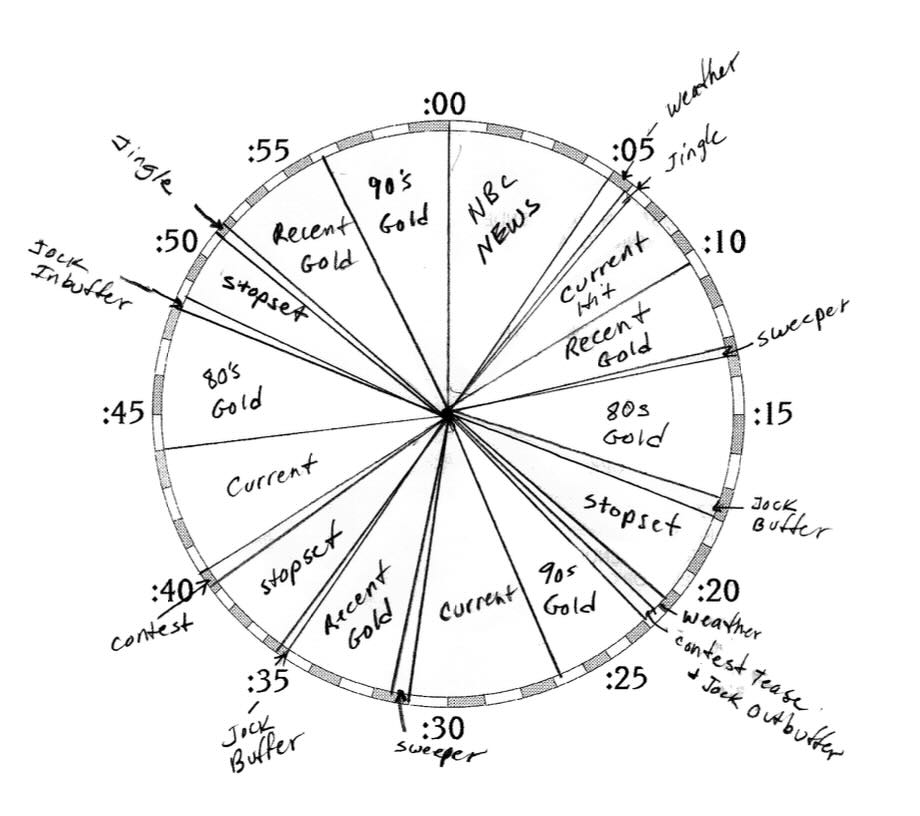
A format clock is a one-page blueprint of a single hour of radio. It describes every element that goes on the air during that hour — every song slot, every commercial break, every news cut-in, every weather check, every promo, every legal ID — and the order in which they fire. The actual songs change. The structure doesn't.
The "clock" name comes from the way these blueprints were traditionally drawn: as a circular dial, with twelve o'clock at the top of the hour and the various elements placed around the dial at the times they happen. A glance at the clock told you what was going to air at any given minute. Most stations don't draw circles anymore — modern automation systems represent clocks as ordered lists rather than wheels — but the term stuck, and the underlying idea is the same: a repeatable, intentional structure for what goes on the air.
Every station has clocks. The ones that don't have written clocks have de facto clocks — whatever the operator happens to do that hour — and those tend to wander. Stations that take the time to design clocks deliberately, and then follow them, sound like a station rather than a stream of audio files. That's the entire payoff.
What Lives on a Clock
A music station's hour-clock typically includes some mix of these elements:
- Music slots — each typed by category (Current, Power Current, Recurrent, Gold, Power Gold, and so on).
- Stop sets — the commercial breaks. Usually two to four per hour, spaced out across the hour rather than clustered.
- Imaging — sweepers, jingles, station IDs, drops between songs. The audio fingerprints that make the station sound like itself.
- Promos — promotional spots for the station's own programming, typically thirty to sixty seconds.
- News and weather — full newscasts at the top of the hour for some formats, short headline cuts or weather checks for others.
- Voice tracks — the host's recorded segments. Short ones between songs, longer ones around stop sets.
- Legal ID — required at the top of every hour for licensed broadcasters: callsign, city of license, exact wording per FCC rules.
- Features — recurring local segments. Pet Patrol, Birthday Club, lunch menu, community calendar, weather sponsor reads. Where small stations actually shine.
A talk station's clock looks different — it's organized around interview blocks, news segments, listener call-ins, breaking-news cut-ins. But the principle is identical: define the structure, fill it with content.
Why You Need One
Without a clock, the station drifts. The morning host plays four songs in a row because they feel like it. The midday operator runs five spots in the same break because three of them got booked late. The afternoon DJ skips the weather because they ran out of time. Listeners notice. Even when they can't articulate what's wrong, they feel the inconsistency.
With a clock — and the discipline to follow it — the station has a heartbeat. Every hour at :15 there's a weather check. Every hour at :32 there's a stop set. Every hour at :55 there's a song that ramps cleanly into the top-of-hour ID. Listeners don't consciously notice this either. They just know the station feels professional. That feeling comes from rhythm, and rhythm comes from a clock.
The second reason is rotation control. Modern music scheduling enforces rules — "a Current can't follow another Current," "a Power Gold can't repeat within four hours," "no two songs by the same artist within ninety minutes." Those rules need slot definitions to operate against. The clock is what makes them executable.
A Walk Through a Typical Music Hour
Here's a simplified midday hour for a hypothetical adult-contemporary music station. Real clocks have more granularity than this — secondary slot types, exact sweeper drops, voice-track timing inside each music slot — but the shape is recognizable. Times shown are approximate; the hour will drift slightly depending on how songs land.
A few things worth noticing about this clock:
- Eleven music slots in the hour. Roughly the standard for music-intensive formats. Talk-leaning stations land closer to seven or eight; pure-music stations push twelve or thirteen.
- Stop sets are spread out, not bunched. Three breaks of two to three minutes each. Listeners stay through breaks they can predict will end soon.
- The category mix is intentional. Power Currents and Power Golds get weighted rotation. Recurrents fill the middle. The mix is what makes the station sound "current" or "comfortable" or "edgy" — the same library, different ratios, completely different feel.
- Voice tracks live at structural junctions. Around stop sets, around promos — not over the middle of music. The host is heard between content, not interrupting it.
- The hour ends with a ramp, not a fade. A song that lands cleanly into the legal ID, with a promo or stinger pulling the listener through the top-of-hour transition. Hours that end in silence or an awkward fade lose listeners at the worst possible moment.
Different Hours, Different Clocks
A common beginner mistake is to design one clock and use it for every hour of the day. Real stations have different clocks for different dayparts because different audiences are listening for different reasons. Some examples of where the clocks should differ:
- Morning Drive (5–9 AM): More talk content, more weather and traffic, more news cut-ins, lighter spot loads (listeners are getting ready and don't tolerate long breaks), shorter songs to make room for content.
- Midday (9 AM–3 PM): Music-heavy, longer sweeps between stop sets, lighter on talk, slightly more current music. The hour shown above is a midday clock.
- Afternoon Drive (3–7 PM): Medium between morning and midday. Heavy traffic and weather. Lifestyle features. Wind-down music as the hour gets later.
- Evenings (7 PM–midnight): Often newer music, more voice tracking, fewer stop sets. Younger audience, different mood, looser feel.
- Overnight (midnight–5 AM): Almost all music. Minimal stop sets. Minimal voice tracking. Frequently a different genre mix entirely — deeper cuts, longer sweeps, the station running on autopilot for the listener who's working third shift.
Most stations also have separate clocks for weekdays vs. weekends, holiday programming, special events, fundraising drives, and any custom shows that have their own structure. A serious station might be running fifteen or twenty different clocks across a typical week — each one tuned for who's listening and why.
Categories and Rotation
A clock's slots are typed by category, and categories let the music scheduler pull songs that fit each slot's intent. A typical music-station category structure looks something like this:
- Current — songs in heavy rotation right now. The newest material in the format.
- Power Current — a subset of Current; the very top tier, the ones you want listeners to hear most often.
- Recurrent — songs that were Current six to eighteen months ago. Still in rotation, lower frequency.
- Power Gold — the strongest older material. The songs that test best with the audience.
- Gold — older material that's been retired from heavy rotation but still fits the format.
- Specialty — format-specific subsets. Local artists, lunchtime flashbacks, holiday tracks, novelty — whatever makes sense for the station.
The clock specifies how often each category appears in the hour. A typical mainstream format might run four Power Currents, three Currents, two Recurrents, two Power Golds, and one Gold per hour. Adjust the ratio and you change the feel of the station — heavier on currents skews younger and newer, heavier on gold skews comfortable and familiar. Same library, different clock, different station.
Common Mistakes
A few easy ones to avoid when you're designing your first clocks:
- Spot loads that bunch up. Three minutes of spots in a row is fine. Eight minutes in a row will lose the audience. If you can't afford to spread the inventory out, you can't afford to sell that much inventory.
- Predictable music order. If the same Power Current always plays at :08 every Monday, listeners notice and start tuning in (or out) at :08. Vary the slot positions across days.
- No tempo variation. All slow songs in a row, or all up-tempo songs in a row, produces fatigue. Most clock designs alternate energy intentionally — high, medium, low, medium, high.
- Voice tracks in awkward places. A voice track over the middle of a song interrupts the music. A voice track stacked on top of a stop set makes the break feel longer than it is. Place voice tracks at structural junctions, not random middles.
- Forgetting the ramp. Hours that end on a long fade-out into the top-of-hour silence sound dead. Always end with a song that ramps cleanly into the legal ID, or place a stinger or promo to bridge the gap.
Designing Your First Clock
A practical sequence for building a clock from scratch:
- Decide the spot load. How many minutes per hour? How many breaks? Two breaks of three minutes each is a clean starting point for a small station.
- Place the stop sets first. Spread them out. :12 · :32 · :49 is a common pattern. Avoid placing one right at the top or one right at the bottom of the hour — those positions belong to other elements.
- Place the structural elements. Legal ID at :00. News, weather, features at the times that make sense for the daypart.
- Decide the music slot count and category mix. Eleven slots? Thirteen? What's the ratio of Power Current to Recurrent to Gold?
- Fill the gaps between structural elements with music slots. Type each slot by category.
- Place voice tracks and promos at clean junctions. Around stop sets, around weather, around the top and bottom of the hour.
- Verify the hour adds up to roughly 60 minutes. Small drift is normal — songs don't all have the same length, and the clock will absorb a few seconds either way.
- Run the clock for a week. Listen back. Adjust. Your first clock will be too crowded, or too sparse, or have a stop set in the wrong place. That's normal. Tune it.
Where ClockWork Fits In
Designing format clocks by hand on paper still works — programmers were doing it that way for decades before computers got involved. But once you've designed a clock, you have to hand it to something that can actually generate the broadcast log: take the clock's recipe, pull songs from the appropriate categories, apply the rotation rules, and produce a minute-by-minute play schedule for the day.
That's the job ClockWork does in the TuneTracker System. ClockWork is the format-clock design and music-scheduling tool included with the suite, and it lets you design an unlimited number of different format clocks — one for morning drive, one for midday, one for afternoon drive, one for evenings, one for overnights, separate ones for weekends, special clocks for holidays and fundraising drives, custom clocks for individual shows. As many as your station needs, with no limit on count or complexity.
You build each clock visually, drop in your imaging and stop sets, set the category mix per slot, and define rotation rules per category. ClockWork mirrors the structure described in this article: the same vocabulary, the same logic, just translated into a tool that can generate broadcast-ready logs and hand them to AutoCast Pro for playout. The clocks you design become the hours your listeners hear, every hour, with the consistency that turns a stream of audio files into a station.
A Clock Is a Promise
The clock is, in the end, a promise to the listener: this is what happens at this station. Music here. Weather here. Legal ID here. Talk here. The promise can be kept or broken, but it has to exist before either is possible. Without a clock, there's no promise — just whatever happens to be playing.
The stations listeners come back to are the ones whose promises are kept. The clocks are how those promises get made.
Build all the clocks you need. As many as you need.
ClockWork is the format-clock design tool included with the TuneTracker System — unlimited clocks, full category control, rotation rules, and broadcast-ready log generation. Free version available. Try designing your first clock tonight.
Explore ClockWork