TuneTracker News
Album Cover Art in Librarian and AutoCast
Librarian finds the covers and checks every match. AutoCast puts them on screen, and brings your logo right back whenever a song has none.
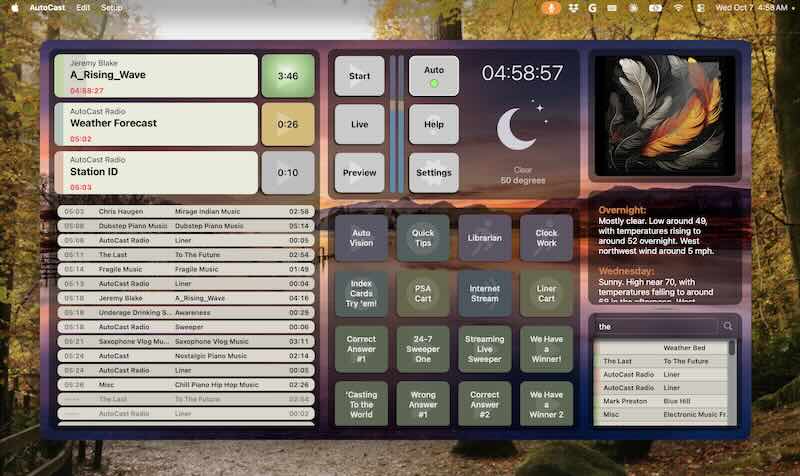
Librarian finds the covers and checks every match. AutoCast puts them on screen, and brings your logo right back whenever a song has none.
Your songs can now show their album covers on screen while they play. Librarian finds the covers and AutoCast displays them, automatically.
Librarian gets covers three ways:
Every cover is saved as a crisp 800×800 picture in your Station folder, one per album. Your audio files are never changed. New songs can get their covers automatically, and covers you set or remove yourself are never overridden.
When a song with a cover starts playing, AutoCast shows the album art in place of your station logo, set against a softly blurred copy of the same picture. When the next song has no cover, your logo comes right back. It's all automatic, with nothing to set up.
Only songs from your log or Playlist Button show art; hot buttons, carts and live sources leave the logo alone.
Choose Check for Updates in Librarian and in AutoCast to get the latest versions.
Librarian finds the covers, AutoCast puts them on screen, and your logo is always there when a song has none.
Learn About LibrarianContinue Reading
Practical guides for broadcasters who care about their craft and their community.