24-Hour Air Archive · macOS
The 24-hour air archive your station has been missing. DayTracker quietly records your on-air signal around the clock and lays out the entire broadcast day as a searchable, scrubbable timeline of songs, breaks, voicetracks, live-mic moments, and silence. Need to hear what really aired at 3 a.m. last Tuesday? Pull up the day, click the moment, and there it is.
Why DayTracker
DayTracker turns the previously opaque, hour-by-hour stream of your station into a labeled, searchable archive. Every song. Every break. Every voicetrack. Every second of every day.
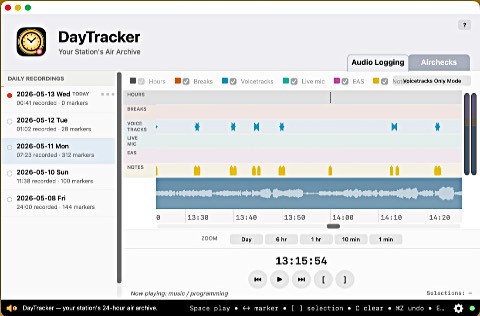
DayTracker captures your on-air audio from AutoCast and anchors it to wall-clock time. If the network hiccups for a few seconds, DayTracker fills the gap with silence and keeps going — so the recording always lines up with what was actually on the air, second for second.
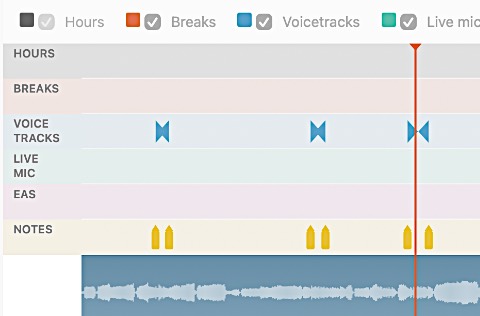
The day is drawn as horizontal "swim lanes" of color-coded markers — songs, breaks, voicetracks, live-mic IN/OUT, EAS, silence. Hover any marker to see its label in the status bar. Click anywhere on the timeline to seek and listen. Zoom from the whole day down to a single second with a two-finger swipe.
Set up cards for the shows you care about — "Mike's Wed Show, 18-21, Live DJ" — and DayTracker quietly exports a clean MP3 every time that window closes. Or mark any time range on the timeline by hand and press E to export. Aircheck files land in a dedicated folder, named and dated, ready to share.
Feature Overview
Every detail aimed at making yesterday's air signal as easy to find as today's.
Audio is pinned to the time of day, not the order it arrived. A short network stall fills in with silence so the timeline never slides out of sync with the markers.
Six lanes — Hours, Breaks, Voicetracks, Live mic, EAS, Notes — keep every kind of event visually separate. One look tells you what kind of moment you're looking at.
Audio over one network channel, markers over another. DayTracker auto-discovers AutoCast through shared settings; no IP addresses to type. Safe alongside live broadcast — DayTracker only listens.
When AutoCast detects dead air, DayTracker writes a silence marker into the Notes lane automatically. Drawn in bright orange so it jumps off the timeline. Clusters of orange = something to investigate.
Click anywhere on the timeline to jump there. Hover any marker and its full label — song title, voicetrack name, break number, your own note — appears in the status bar. No menus, no clutter.
Press [ to start a selection at the playhead, ] to commit. Mark as many as you need across the day, then press E to export every selection as a separate MP3 aircheck.
One card per recurring show. Pick the days, the start and end hour, and whether to capture Live DJ or Voicetrack segments. DayTracker checks every 30 seconds and exports automatically when each window closes.
From "Crummy" (8 kbps, voice only, tiny files) to "Crazy Good" (96 kbps, near broadcast quality). All at 22050 Hz mono. The default "Good" setting fits a year of logs comfortably on a 100 GB drive.
At midnight, DayTracker rolls to a fresh file for the new day and keeps recording. Yesterday's archive stays right where it was — complete, untouched, and ready to scrub.
Each day produces four files in ~/Documents/DayTracker/: the MP3, the markers CSV, a manifest, and pre-computed waveform peaks. Plain formats, no proprietary lockup. Copy a day to an archive disk and it stays loadable forever.
Stereo VU pair on the right edge of the timeline while viewing today. See in real time exactly what's being received and recorded.
Pass your mouse over any control and a plain-English description appears in the status bar at the bottom of the window. No guessing what a button does — just hover and read.
$199, one time. No subscriptions. No cloud fees.
Just a quiet, reliable archive of every minute that went on the air.