| |
The power to turn radio dreams into radio reality.TuneTracker Basic™ is a complete radio automation system, and one of the most stable and reliable systems available at any price. It's a Sherman tank that just keeps going and going and going. TuneTracker's ultra-flexible formatting system lets you design any kind of radio station you can think up. And its live-assist functions let you go live and DJ any time you like. The system is sold as software-only, and includes the powerful Be operating system.* TuneTracker Basic™ and the impressive suite of software that comes with it, provide you with everything you need to broadcast over the air, the Internet, or both at the same time, to generate your own music mix using innovative music selection software, to mark songs properly for more powerful music searches, and to generate reports on exactly what ran, and when. Also included in the system are useful broadcast utilities that let you add extra information to your songs, a stopwatch program, configurable hotkeys, and excellent, detailed documentation.
A clear, easy interface...
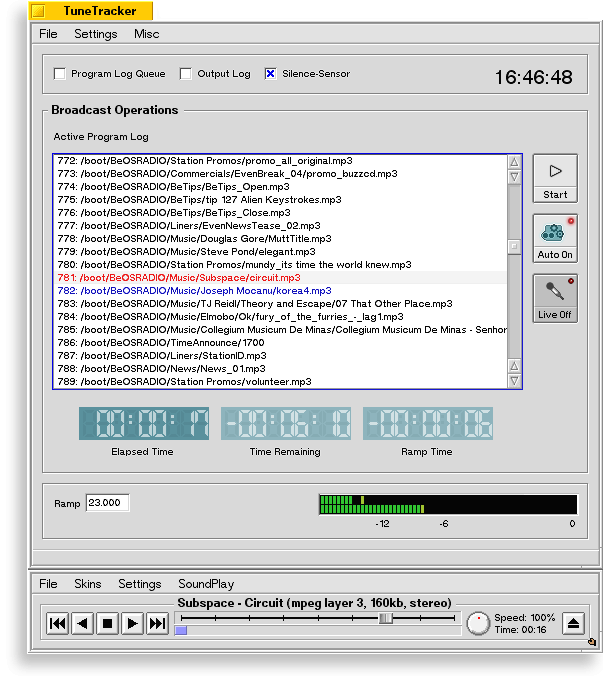
 TuneTracker Basic™ has been carefully designed to present only the most essential items on its graphical user interface. This has been done to make TuneTracker's control surface clean, uncluttered, easy to learn, and easy to use. That makes it a great system for professionals and amateurs alike, and especially nice when training newcomers, volunteers, and students. TuneTracker Basic™ has been carefully designed to present only the most essential items on its graphical user interface. This has been done to make TuneTracker's control surface clean, uncluttered, easy to learn, and easy to use. That makes it a great system for professionals and amateurs alike, and especially nice when training newcomers, volunteers, and students.How easy is it? Here's our challenge to you. Click on the small picture here, and have a look at the full-sized TuneTracker Basic™ interface. We bet that in two minutes or less, you will already know how to start an event, go live, go into and out of automation mode, view the scrolling program log, open up an output log window to see what's already played, toggle the silence sensor on and off, pop open the queue of loaded program logs, determine what's playing and what's next, see how long a song has been playing and how long it will be before it is done, and tell by the countdown ramp timer long you can still talk before the singing starts. Ok, go to it.
The flexibility to do radio, your way...With TuneTracker Basic™, you have the flexibilty to turn your radio ideas into radio reality. You can create as many unique format clocks as you like, and mix and match them in any combination you want to create as many different daily master logs as you need. The result? Whether you want to create a full commercial station, a non-profit station, simple on-hold station, a hospital radio station with many unique dayparts, a music-and-message gospel station, a complex all-news format with vastly differing clocks from one hour to the next, or an international shortwave station that broadcasts different language programming at different times of the day, TuneTracker Basic™ will handle it like a champ. Special TuneTracker Basic™ automation features...TuneTracker Basic™ lets you perform all sorts of little feats of radio magic that will make your station sound polished and professional.
A single line in your program log can tell TuneTracker to fade out of whatever is currently running and move to a specific audio event at a specific time, giving you the ability to, for example, play a station ID just before the hour, and join a live network for five minutes of news, all on an automated basis.
"Time-corrects" can be built into your program log, to keep your programming running on-time and on-schedule.
A configurable "Pause" event can be added, to tell your automation to stop running at a specific time, for a specific length of time, even an entire overnight, and then TuneTracker Basic™ can "wake itself up" at a time you specify and start broadcasting again.
A unique TuneTracker Basic™ innovation is the "Relay" event, which allows TuneTracker Basic™ to pick up an Internet audio stream being transmitted from another source, and relay it over your local broadcast signal on an automated basis, for whatever periods of time you specify. The Relay option works even when TuneTracker's broadcast is also a streaming signal. With this feature, you can even "go live" from a remote location via the Internet. Running a corporate conference stream to your private intranet? Pick it up and relay it live over your official "corporate radio station."
A "silence sensor" stubbornly refuses to allow you to broadcast nothing. Sensitivity controls and a wait-time let you configure it just how you want it. As with most-all features in TuneTracker, the silence sensor can be turned on and off automatically using your program log.
Deadly top-of-the-hour accuracy when joining networks for live audio.
Blink-once log loading. Program Logs load and parse so fast you can barely see it happen.
Enhancements make TuneTracker capable of accurate leaps in and out of live network programming at-will, even many times an hour.
Clear, unambiguous error reporting. Make a goof in your log? TuneTracker will show you what's wrong and where, so you can find it and fix it quickly and easily.
Also in the TuneTracker Basic™ suite...
TuneStacker™, which builds a fresh mix of music for you every day, based on your own creative criteria.
Army Knife lets you "empower" your music with extra "attribute" information, resulting in better music mixes
CSacker™ (pronounced, SEE-sacker), which generates reports on what ran, and when.
The Be Operating System, "BeOS"
A pre-configured Station folder and subfolders, for organizing your station's contents
A full, comprehensive, well-written user's manual in HTML format that you can read right on your computer screen. Also a printable version available here online.
Pre-configured hotkeys that launch some of the most useful tools and utilities without having to find and double-click on icons for them
Mozilla Firefox browser. A terrific web browser and documentation reader.
The SoundPlay "audio engine," and LiveEncoder streaming server that will broadcast multiple streams in both MP3 and Ogg Vorbis formats.
Free expert TuneTracker online technical support including e-mail support and weekly QuickTips.
A whole month of free telephone support.
TuneTracker's "Infinite Walkaway™" means peace-of-mind... If a radio automation system can't be trusted to keep going when you leave it alone, it is really of no use. TuneTracker Basic™ has been specially coded to be a survivor...rock-solid and dependable (read our testimonials!), so you can set it up, start it up, and walk away confidently. If a radio automation system can't be trusted to keep going when you leave it alone, it is really of no use. TuneTracker Basic™ has been specially coded to be a survivor...rock-solid and dependable (read our testimonials!), so you can set it up, start it up, and walk away confidently.
Aside from its stability and stubborn determination to keep going no matter what, TuneTracker Basic™ also benefits from a bottomless program log queue. Drag and drop as many program logs into the queue as you want, for days, weeks, or months of unattended operation. Still not good enough? Click the "Repeat" x-box and TuneTracker Basic™ will cycle back through the entire list of program logs again when it reaches the end. An obvious use of this approach is to put in a week's worth of daily program logs and have TuneTracker Basic™ repeat the week "infinitely." Some situations may only require a single program log, or just a portion of a day, repeated over and over. An automated public address system may only contain a dozen audio events in a mini-program log. It makes no difference. TuneTracker Basic™ will happily oblige. Adding to its reliability, TuneTracker Basic™ comes equipped with a very reliable and configurable silence sensor which will bail you out if your live satellite audio feed suddenly fails in mid newscast.
Behind the magic...
| |
| "Needless to say, the radio automation solutions being purchased by most stations are expensive. Less apparent to the general public is the fact that much of this expensive software is buggy, difficult to set up and use, and suffers from performance limitations imposed by the underlying operating system. In contrast, TuneTracker is a radio-automation solution that is actually enhanced by the underlying OS."
Scot Hacker
BYTE.COM |
|
TuneTracker Basic™ owes some of its amazing stability and capabilities to the operating system it runs under, the remarkable Be Operating System ("BeOS"), a smooth, fast media-friendly operating system which is included with each TuneTracker system.Initially, some find the prospect of using a different operating system a little unnerving. We would like to reassure you that BeOS is at least as easy to use as Windows. Its interface is nearly identical, but BeOS is infinitely-more stable and reliable. Once you have installed it and used it, you will wonder why you ever tried to get by doing radio any other way. Counting on Windows to run your radio station? Now that's unnerving.
Learn even more about TuneTracker Basic...To read much more about TuneTracker Basic™ and all its capabilities, check out our detailed online documentation.
Got questions?We're happy to help. Call 920-672-8244 with your pre-sale questions, or use the form below to place your order.

|
TuneTracker Basic™
Radio Automation Suite
Single user license - TuneTracker Basic™ Radio Automation Software Suite with free "BeOS" Operating System and free shipping. Delivered on CD via U.S. mail. Keyfile delivered via e-mail.
Clicking this button certifies you agree to our terms and conditions.
|
$199 
|
|
* TuneTracker Basic is sold as a software-only solution, so be certain of your existing hardware's compatibility with BeOS before obtaining this package. We recommend you double-check your hardware compatibility to assure a trouble-free installation. TuneTracker Systems does not warrant that BeOS will run on your particular hardware configuration and does not issue refunds on that basis.If you are unsure about the compatibility of your existing hardware, you should purchase a AutoCast Station-in-a-Box instead.
|