Every radio station, no matter how small, needs something that puts audio on the air at the right moment, in the right order, and never stops. In the broadcast world, that's called playout — and the software that does it is the most important program your station runs.
If you're shopping for radio playout software for a Mac, you've probably noticed the options thin out fast. Most playout systems were built for Windows, and the handful that mention macOS often turn out to be ports, web apps, or tools designed for podcasting rather than 24/7 broadcast. This guide explains what playout software actually does, what separates a real broadcast playout system from a glorified media player, and what to look for on the Mac.
What Is Radio Playout Software?
Playout software is the part of a radio automation system that actually plays the audio — the songs, spots, station IDs, liners, voice tracks, and network feeds — and sends it to your transmitter or stream. When people say a station is "playing out" of a computer, this is the program doing the work.
A playout system reads a program log: the minute-by-minute schedule of everything that should air. It plays each item in order, handles the transitions between them, fires timed events at the right second, and keeps going around the clock whether anyone is in the building or not.
Playout is one piece of a larger picture. A complete station also needs a way to organize its music library, build format clocks, generate logs, and stream to the internet. Some products do only playout and leave the rest to you. Others, like TuneTracker, give you an integrated suite where all of those pieces are designed to work together.
Playout vs. Automation vs. Live Assist
You'll see these terms used loosely, so it helps to pin them down:
- Playout is the engine that plays audio from a log, on time, in sequence.
- Automation is playout running unattended — overnight, on weekends, or all day — with no one touching it.
- Live assist is playout with a human in the chair. The software still runs the log, but the host decides when to start each event, talks over intros, and fires jingles and carts from hot buttons.
A good playout system handles all three and lets you move between them without stopping the music. Your morning host runs live assist, then walks out the door at 10 and the station keeps going on its own.
What to Look For in Mac Playout Software
1. Stability you can walk away from
This is the one that matters most. Playout software that crashes means dead air, and dead air means listeners tuning away. Look for a system built for unattended operation, with a watchdog that detects problems and recovers on its own.
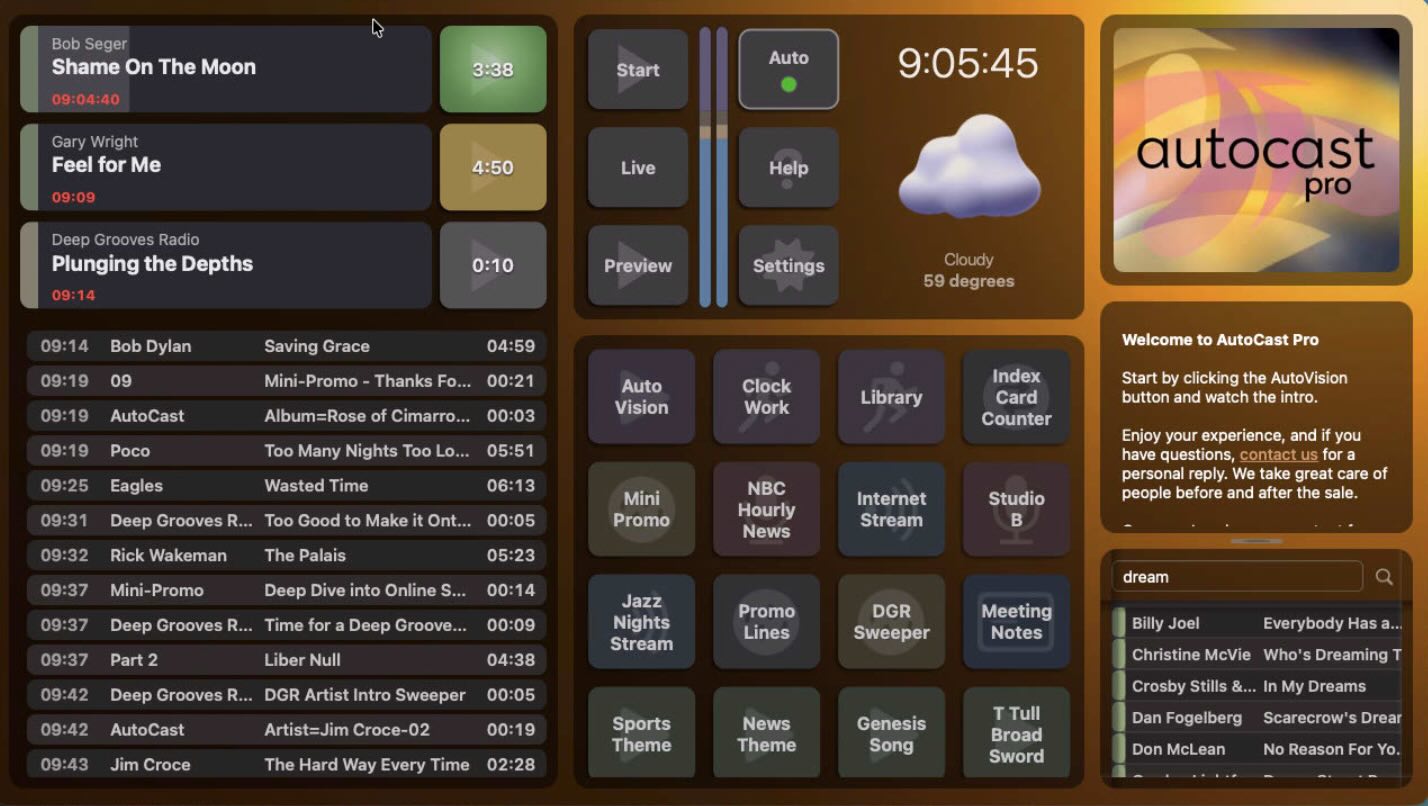
AutoCast, the playout engine at the center of TuneTracker System 7, is built around what we call Infinite Walkaway™ stability. A built-in watchdog monitors playback continuously and self-recovers from interruptions — returning to the precise second in the correct audio file, even after a power outage. A silence sensor with dual-mode dead air detection watches your output and takes action before anyone notices.
2. Native to the Mac, not a port
Software that was written for Windows and translated to the Mac tends to feel like it. It doesn't follow Mac conventions, it lags behind macOS updates, and it's rarely the developer's priority. A Mac-native playout system takes full advantage of the platform — including Apple Silicon, which is fast, cool, and quiet enough to run a station from a Mac mini on a shelf.
TuneTracker System 7 is built exclusively for macOS. It runs natively on Apple Silicon and on Intel Macs running macOS Ventura (13) or later.
3. Precise timing
Radio runs on the clock. Network joins, top-of-hour IDs, and satellite feeds have to happen on the second. Look for hard-start and soft-start event scheduling, and a schedule engine that doesn't drift over the course of a day. AutoCast's timed events are millisecond-accurate, and its drift-free schedule engine keeps the log on time hour after hour.
4. Clean transitions
The difference between a station that sounds professional and one that sounds like a playlist is what happens between songs. Real playout software gives you control over every segue: EOM (end-of-message) fades, hard cue points, and ramp markers so voice tracks land perfectly over song intros. It should also even out volume differences and trim dead air from the start and end of files automatically.
5. Live-assist tools that don't get in the way
If anyone will ever sit in front of the station live, the playout screen has to be friendly under pressure. AutoCast gives hosts a single-window interface, a programmable ButtonPad with 11 button types for jingles, carts, and scripts, instant library search for requests, and an off-air preview channel so you can listen to anything before it airs.
6. It works with everything else
Playout doesn't live alone. It needs to take logs from your music scheduler and traffic system, export as-run logs for billing, control satellite switchers, and update "now playing" on your website. Check what a playout system integrates with before you commit — and whether those integrations cost extra.
AutoCast Playout at a Glance
- Infinite Walkaway™ unattended operation with three-stage watchdog and reboot recovery
- Millisecond-accurate hard-start and soft-start events
- Live-assist mode with per-event start buttons and a programmable ButtonPad
- EOM fades, hard cues, voice-track ramps, and consistent volume with SteadyCast™
- Plays WAV, AIFF, FLAC, MP3, and Ogg Vorbis at mixed bitrates and sample rates
- Traffic log import, as-run export, and satellite switcher control (Pro version)
- Integrated with ClockWork scheduling, Librarian, and SignalCaster streaming
What About Free Radio Playout Software?
Free playout options exist, but most of them are either hobby projects, stripped-down trials, or Windows-only. The questions to ask are the same ones you'd ask of paid software: Will it run unattended for weeks? Is anyone maintaining it? What happens when you outgrow it?
TuneTracker takes a different approach. System 7 Free is the full playout and automation system — AutoCast, ClockWork, and Librarian — with no time limit and no credit card. The only limit is a 250-track library. When your station grows past that, a one-time license unlocks unlimited tracks. No subscription, ever.
Getting Started with Playout on a Mac
If you have a current Mac, you already have a station computer. Which Mac you choose depends mostly on how many other jobs it'll be doing, but any Apple Silicon Mac will run a station comfortably.
Download TuneTracker System 7, install it like any Mac app, and you can have audio playing out in minutes. Built-in help and in-app video tutorials walk you through setting up your library, clocks, and first log. And if you're coming from a Windows playout system, we've written a guide to migrating your station to the Mac.
To see everything AutoCast can do, visit the AutoCast playout and automation page.
Try Mac-Native Radio Playout Free
AutoCast, ClockWork, and Librarian — the complete TuneTracker System 7 playout and automation suite. Up to 250 tracks, no time limit, no credit card.
Download Now — It's Free