Every radio station runs on software now. Whether you're a full-power commercial station, an LPFM on a volunteer budget, a school station, or an internet broadcaster working from a spare bedroom, radio automation software is what keeps your signal on the air when nobody's in the chair — and what makes your station sound polished when somebody is.
But "radio automation" covers a lot of ground, and the options range from free hobby tools to five-figure enterprise systems. This guide walks through what radio automation software actually does, the pieces a complete system needs, the big decisions you'll face when choosing one, and a checklist you can use to compare any system — including ours.
In This Guide
What Radio Automation Software Does
At its simplest, radio automation software plays the right audio at the right time, in the right order, without a person pressing buttons. Songs, commercials, station IDs, liners, voice tracks, network news, satellite programming — the software strings it all together into a continuous broadcast and sends it to your transmitter, your internet stream, or both.
But playing audio is only the visible part. Behind it, a real automation system is also deciding what plays: rotating your music so listeners don't hear the same song twice in an hour, placing commercials where they were sold, hitting the network join at the top of the hour on the second, and recovering on its own if something goes wrong at 3 a.m.
Most stations use automation in some mix of three ways:
- Fully automated — the station runs unattended, overnight or around the clock.
- Live assist — a host is in the studio, but the software runs the log and handles the music, spots, and imaging while the host talks and takes calls.
- Voice tracked — hosts pre-record their breaks, and the software drops them in between songs so the station sounds live when it isn't.
A good system handles all three and lets you move between them without stopping the music.
The Parts of a Complete Radio Automation System
Some products do one of these jobs. Others try to do all of them. Either way, every station needs each of these covered somehow.
Playout
The engine that actually plays the audio from a program log, handles transitions between items, and fires timed events. It's the heart of the system and the part that has to be the most reliable. We've written a separate guide on what to look for in playout software.
Music scheduling and format clocks
A music scheduler builds your program logs — the minute-by-minute plan for every hour — from a set of format clocks that define what type of content goes where. It enforces rotation and separation rules so your station sounds programmed, not shuffled. If format clocks are new to you, start with Understanding Format Clocks.
Library management
Your music, spots, and imaging all need to be imported, categorized, and prepared for air: correct metadata, consistent volume, and transition markers so songs segue cleanly. A good library tool makes this fast; a bad one makes it the job nobody wants.
Traffic and commercial logs
If you sell advertising or run underwriting, your automation needs to accept logs from a traffic system and report back what actually aired (an "as-run" log) for billing. Many small stations don't need this on day one — but check that it's available before you need it.
Streaming
Most stations now stream online, and many exist only online. Some automation systems include streaming; others leave you to bolt on a separate encoder. See Should Your Radio Station Stream? for the costs, licensing, and mechanics.
Voice tracking and remote tools
The ability for hosts to record breaks from home, or run a live broadcast from a remote location, has gone from luxury to expectation. If remote work matters to your station, look closely at how each system handles it. Our remote broadcasting guide covers the options.
Five Decisions That Shape Your Choice
1. Integrated suite or separate tools?
You can assemble a station from separate products — one company's playout, another's music scheduler, a third party's streaming encoder — or choose a suite where everything is designed to work together. Separate tools give you choice; a suite gives you fewer handoffs, one support contact, and no finger-pointing when something breaks. For small stations without an engineer on staff, integration is usually worth a lot.
2. Local software or cloud-based?
Cloud radio platforms run your station from someone else's servers. They're convenient to start, but your programming, your library, and your uptime depend on their business and their internet connection. Local software runs on a computer you own, with files you control, and keeps playing if the internet goes down. We explain the trade-offs in Your Files. Your Computer. Your Station.
| Local automation | Cloud platform | |
|---|---|---|
| Where your audio lives | On your computer | On the provider's servers |
| If the internet goes down | Keeps playing to air | Depends on the setup |
| Typical cost model | One-time or annual license | Monthly subscription |
| Control over programming | Complete | Within the platform's limits |
3. Windows or Mac?
Radio automation grew up on Windows, and most systems still run only there. That's history, not a technical requirement. Modern Macs — especially Apple Silicon models — are quiet, efficient, and stable enough to run a station for months without a reboot, and the Mac's audio system was built for professional work from the start. If your station already runs on Macs, or you'd like it to, a Mac-native system saves you from maintaining a Windows machine just for automation. Read why the "gotta use PCs" assumption no longer holds, and if you're moving over, our Windows-to-Mac migration guide.
4. Subscription or one-time purchase?
Subscription pricing looks cheaper in the first year and costs more every year after. A one-time license costs more up front and nothing ongoing. Run the numbers over five years, not one. For stations on tight budgets, a predictable one-time cost is often easier to plan for — our small station budget guide goes deeper.
5. Free, or paid?
Free radio automation software exists, but most of it is either a time-limited trial, a stripped-down version of a paid product, or a volunteer project with uncertain support. That can be fine for experimenting. For a station that has to stay on the air, look for something free that's actually the real product — and a clear, affordable path when you outgrow it.
What Radio Automation Software Costs
Prices vary enormously. Broadly:
- Free tools — $0, with trade-offs in features, limits, support, or reliability.
- Small-station systems — a few hundred to around a thousand dollars, usually one-time.
- Cloud platforms — a monthly fee that continues as long as you're on the air.
- Enterprise systems — built for multi-station groups, often $10,000 or more, plus support contracts and dedicated hardware.
Don't forget the computer. Some systems need dedicated, specialized hardware. Others run on an ordinary desktop. Any current Mac can run TuneTracker — see which Mac you actually need.
A Checklist for Comparing Radio Automation Systems
Whatever you're considering, ask these questions:
- Can it run unattended for weeks without a restart? What happens after a power failure?
- Does it detect dead air and recover on its own?
- Are timed events accurate to the second, all day long?
- Does it include music scheduling, or will you need another product?
- How easy is it to import and prepare your library?
- Does it support live assist and voice tracking?
- Can it stream, or will you need a separate encoder?
- Can it take traffic logs and export as-run reports, if you'll need them?
- Does it run on the computers you already own?
- What's the five-year cost, including subscriptions and upgrades?
- Can you try the real product before you pay?
- When something goes wrong, who answers?
Where TuneTracker Fits
TuneTracker System 7 is a complete radio automation suite built exclusively for the Mac. It's designed for the stations this guide is written for: community and LPFM stations, small-market commercial stations, schools, and internet broadcasters.
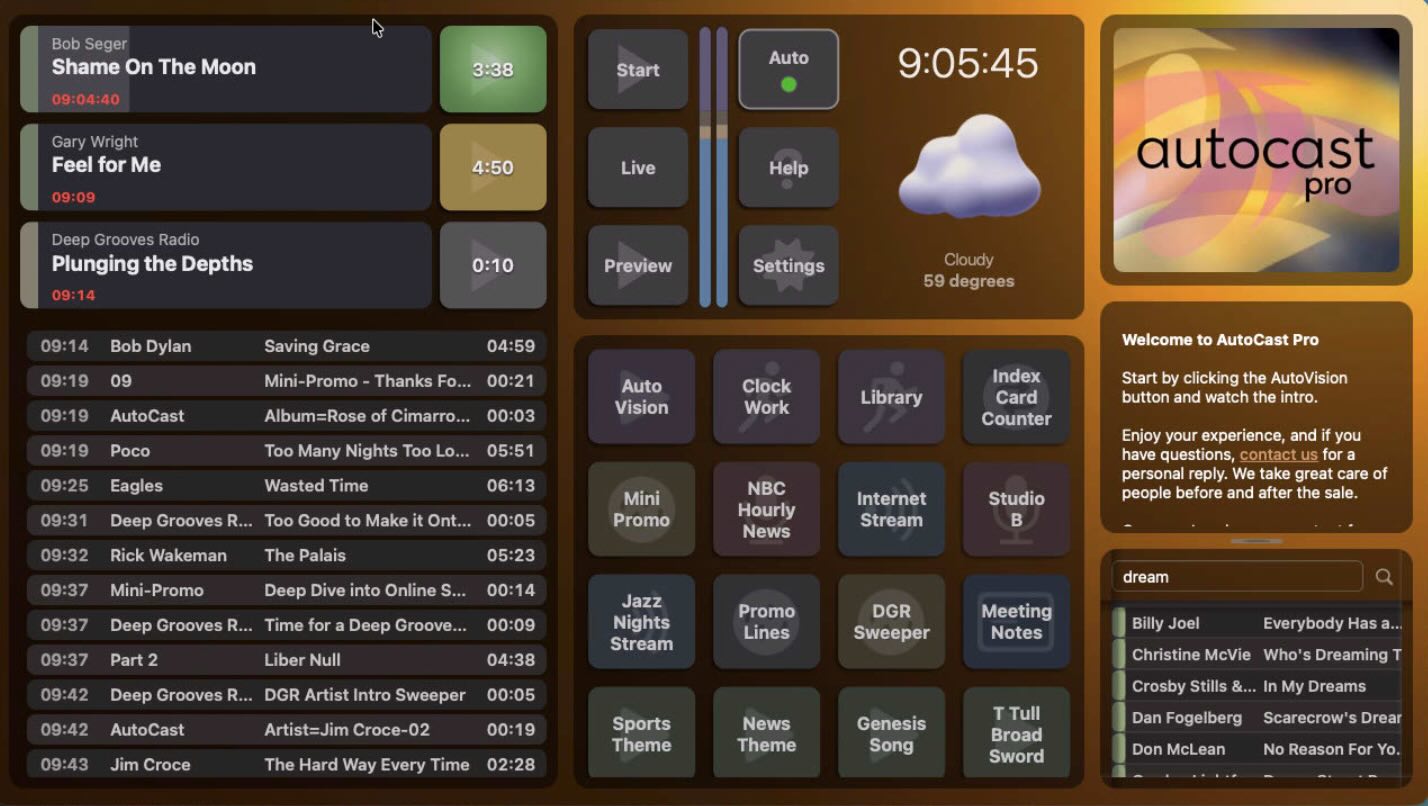
- AutoCast Pro — playout and automation, with live assist, voice-track integration, and Infinite Walkaway™ unattended stability.
- ClockWork — format clocks and music scheduling that generate your program logs automatically.
- Librarian — library management, with attribute editing and graphical transition markers.
- SignalCaster — internet streaming, included with System 7 Basic and Pro.
TuneTracker System 7 Pricing
- System 7 Free — AutoCast Pro, ClockWork, and Librarian. Fully functional, no time limit; the only limit is a 250-track library.
- System 7 Basic — $299 — unlimited library, plus SignalCaster for internet streaming.
- System 7 Pro — $999 — everything in Basic, plus traffic integration, satellite/switcher control, and time and temperature announcements.
- One-time purchase. No subscription. Runs on macOS 13 or later, Apple Silicon or Intel.
All three tiers are the same download, so you can set up your whole station on System 7 Free and upgrade with a key code when you're ready. Read more about why we offer free radio automation software.
Try TuneTracker Radio Automation Free
The complete System 7 suite for Mac — playout, scheduling, and library management. Up to 250 tracks, no time limit, no credit card.
Download Now — It's Free