What Is Voice Tracking? How Radio Stations Sound Live When Nobody's There
Voice tracking is how a station with an automated schedule still sounds like it has a real person on the air. The host records their talk breaks ahead of time, and the automation system drops them in between songs. Here's how it works, who uses it, and what to look for in voice tracking software.
By TuneTracker Systems · October 2026
Turn on almost any radio station overnight, or on a weekend, or in a small market in the middle of the afternoon, and there's a good chance the friendly voice introducing the next song isn't in the building. It may not even be in the same state. The host recorded that break hours or days earlier, and the station's automation system is playing it back at exactly the right moment. That's voice tracking.
Voice Tracking, Explained
A voice track (sometimes written “voicetrack”) is a short recording of a host talking: introducing a song, giving the weather, plugging an event, or just saying something human between two songs. Voice tracking is the practice of recording those breaks in advance and placing them into the program log, so the automation system plays them in sequence with the music, spots, and station IDs.
Done well, listeners can't tell the difference. The host talks about the song that just played, sets up the next one, and the music comes in right where it should. It sounds live because the host did exactly what they would do live; they just did it earlier.
Why Stations Use It
A live sound without a live shift. A host can cover several hours of programming in a short recording session instead of sitting in the chair for the whole show.
Hosts who aren't local. A voice track can be recorded from a home office, a hotel room, or another city. A small station can have a personality on the air that it couldn't otherwise staff.
Nights, weekends, and holidays. Automation keeps the station running when no one is around, and voice tracks keep that stretch of the day from sounding like a playlist.
Consistency. You can re-record a flubbed break, tighten a rambling one, and make sure every hour sounds the way you want it to.
For LPFM and community stations in particular, voice tracking stretches a small volunteer roster a long way. Our guide to choosing a radio automation system covers where it fits in the bigger picture.
How Voice Tracking Works
The mechanics are simple. The automation system builds a program log, which is the schedule of everything that will air, and leaves a voice track slot at each place where a host will talk. The host then fills those slots:
Listen. Hear the end of the song that's finishing and the start of the one that follows, so you know what you're talking over.
Record. Talk naturally over that transition.
Fine-tune. Adjust how your voice overlaps the music, for example whether the next song starts under your last words or after a breath of silence.
Save and move on. The finished track goes to the station, and the host goes on to the next slot.
At air time, the playout system plays the voice track just like any other item in the log. That's why the quality of the playout engine matters; our article on radio playout software for the Mac explains how transitions, ramps, and timing make a recorded break land the way a live one would.
What to Look For in Voice Tracking Software
Voice tracking needs software built for the job. TuneTracker Systems makes its own, called VoiceTracker, an add-on module for the TuneTracker System. We'll use it below to show what each of these points looks like in practice, but the checklist applies to any voice tracking software you're considering.
It should let you hear what the listener will hear
The hardest part of voice tracking is timing. If you can't hear the songs on either side of your break while you record, you're guessing. Good software plays the outgoing and incoming songs as you talk and shows them on screen so you can slide them into place.
It should be easy enough that people actually use it
If recording a break is a chore, hosts stop doing it, and the schedule fills up with dead spots. Look for something fast, with a small number of keystrokes per break, that a first-time host can pick up in a few minutes.
It should work from wherever your hosts are
If your hosts live somewhere other than the studio, you don't want to ask them to install software and sync folders on their own computers. A tool that runs in a web browser avoids that.
It should hand the result straight to your automation
Exporting files, renaming them, and importing them by hand is where voice tracking projects go to die. The finished tracks should land where the playout system expects them, already timed.
Bonus: help with what to say
Even experienced hosts get stuck on what to say about the fourth song of the hour. Tools that suggest talking points about each artist and song save a lot of prep time and make a voice-tracked show sound more informed.
VoiceTracker at a Glance
Runs in a web browser, with nothing to install on the host's computer; all you need is a microphone
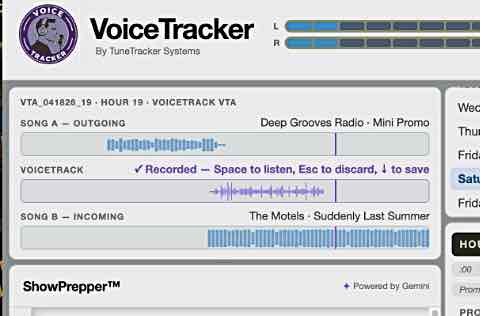
Plays the outgoing and incoming songs while you record, so you hear the transition as listeners will
Drag the song waveforms to set exactly how your voice overlaps the music
ShowPrepper creates instant show prep notes for every song in the hour
Four keys run the whole workflow: Space, R, Esc, and the down arrow
Finished tracks go to the station automatically, ready for AutoCast to air
How Long Does It Take?
Less than most people expect. With VoiceTracker, each break takes roughly 30 to 60 seconds from start to finish, and a full hour of voice tracks typically takes five to ten minutes. Once a host gets into the rhythm of listen, record, adjust, save, they can build an entire show in a sitting.
The goal of voice tracking isn't to fool anyone. It's to give a station a real voice and a real personality, at the hours when a live shift isn't practical.
Voice Tracking with TuneTracker
VoiceTracker is TuneTracker's voice tracking module. Hosts log in from any web browser, pick a slot in the program log, and record over a real-time preview of the transition. The tracks sync to your station and AutoCast plays them in the log just like any other element. It's a one-time purchase, with no subscription.
VoiceTracker works with the rest of the TuneTracker System. If you'd like to see how the pieces fit before adding voice tracking, TuneTracker System 7 (AutoCast, ClockWork, and Librarian) is free, with no time limit and no credit card. The VoiceTracker documentation also walks through recording a voice track step by step.
VoiceTracker shows the outgoing song, your recorded voice track, and the incoming song, so you can see exactly where your break lands.
Give Your Automated Hours a Real Voice
See how VoiceTracker works, or start with the free TuneTracker System 7 playout and automation suite.